

Finding a laptop that offers the right mix of performance, portability, and display quality is not easy, especially in the crowded mid-range segment. Many thin and light laptops compromise on power, battery life, or screen quality. The Acer Swift Go 14 aims to break this pattern by delivering a balanced experience suitable for students, professionals, and everyday users.
In this detailed review, we take a closer look at the Acer Swift Go 14, covering its design, build quality, display, performance, battery life, keyboard, connectivity, and real-world usability. By the end, you will have a clear idea of whether this laptop fits your daily needs.
Design, Build, and Portability
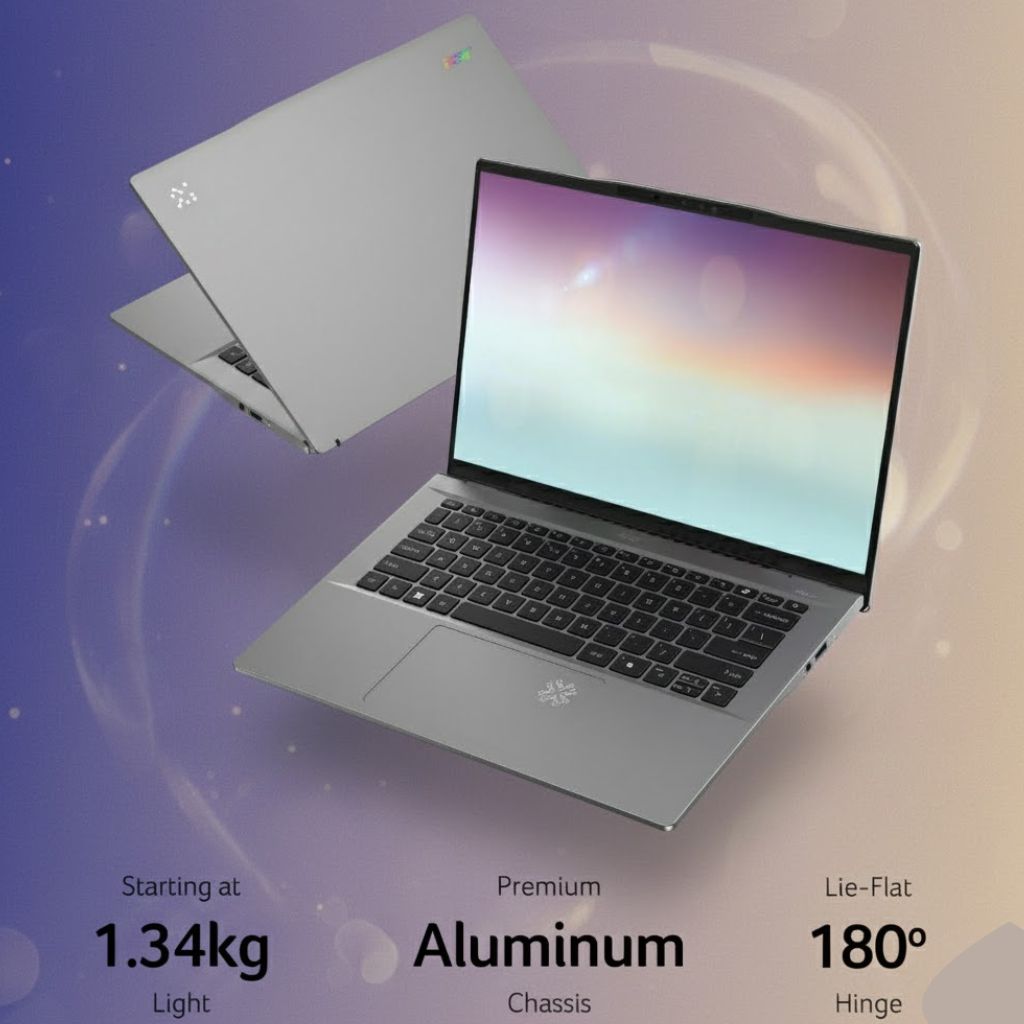
The Acer Swift Go 14 is designed with mobility as a priority. Its slim body and lightweight construction make it easy to carry throughout the day, whether you are commuting to work, attending classes, or traveling. The laptop slips easily into a backpack without adding noticeable weight.
Acer has kept the design clean and professional. The subtle branding and smooth finish make it suitable for both formal and casual environments. While the materials may not feel as premium as more expensive ultrabooks, the overall build quality is solid and reliable for daily use.
The hinge feels stable and allows smooth opening and closing of the lid. There is minimal flex during normal use, which adds to the laptop’s overall durability.
Display: A Major Highlight
One of the most impressive features of the Acer Swift Go 14 is its display. The laptop comes with multiple display options, including high-resolution OLED panels. The 14-inch screen with a 16:10 aspect ratio offers more vertical space, which improves productivity when working on documents, spreadsheets, or web pages.
The OLED display variant delivers excellent contrast, deep blacks, and vibrant colors. This makes it ideal for watching movies, editing photos, and consuming multimedia content. Text appears sharp and easy on the eyes, even during long working sessions.
Users who choose the non-OLED versions still get a sharp and bright display that performs well for everyday tasks. Overall, screen quality is one of the strongest reasons to consider the Acer Swift Go 14.
Performance and Real-World Usage

The Acer Swift Go 14 is powered by modern processors designed for efficiency and smooth multitasking. These processors handle everyday activities such as web browsing, document editing, video calls, and streaming without any issues.
For students and office professionals, the laptop delivers consistent and reliable performance. Applications load quickly, and multitasking feels smooth. Light creative tasks such as basic photo editing or short video edits are also manageable.
However, this laptop is not built for heavy workloads like advanced video editing, 3D modeling, or high-end gaming. During prolonged heavy use, the laptop may get warm, and the fan noise can become noticeable. For typical daily usage, though, performance remains stable.
Graphics and Multimedia Experience
The Acer Swift Go 14 uses integrated graphics, which are suitable for most everyday needs. Streaming high-resolution videos, attending virtual meetings, and running productivity software are all handled smoothly.
Casual gaming is possible with older or less demanding titles at lower settings. However, users who need powerful graphics performance should consider laptops with dedicated GPUs.
For entertainment and general use, the graphics performance of the Acer Swift Go 14 is more than sufficient.
Battery Life and Charging Support
Battery life on the Acer Swift Go 14 depends on usage and configuration. For light to moderate tasks such as browsing, writing, and media consumption, the laptop can last several hours on a single charge.
More demanding tasks, higher brightness levels, and OLED displays may reduce battery life. Thankfully, fast charging support helps reduce downtime by allowing quick recharging when needed.
While it may not offer true all-day battery life for heavy users, the battery performance is reasonable for a thin and lightweight laptop.
Keyboard and Touchpad Comfort
The keyboard on the Acer Swift Go 14 provides a comfortable typing experience. The keys are well-spaced, and the key travel is suitable for long typing sessions. The backlit keyboard adds convenience when working in low-light conditions.
The touchpad is responsive and accurate, supporting multi-touch gestures smoothly. It performs well for everyday navigation and productivity tasks, although power users may still prefer an external mouse.
Webcam, Audio, and Online Communication
A high-quality webcam makes the Acer Swift Go 14 suitable for online meetings, virtual classes, and video calls. The image quality is clear enough for professional communication.
The speakers deliver decent audio output for video calls, movies, and casual music listening. While they may lack deep bass, they are sufficient for everyday use.
Connectivity and Port Selection
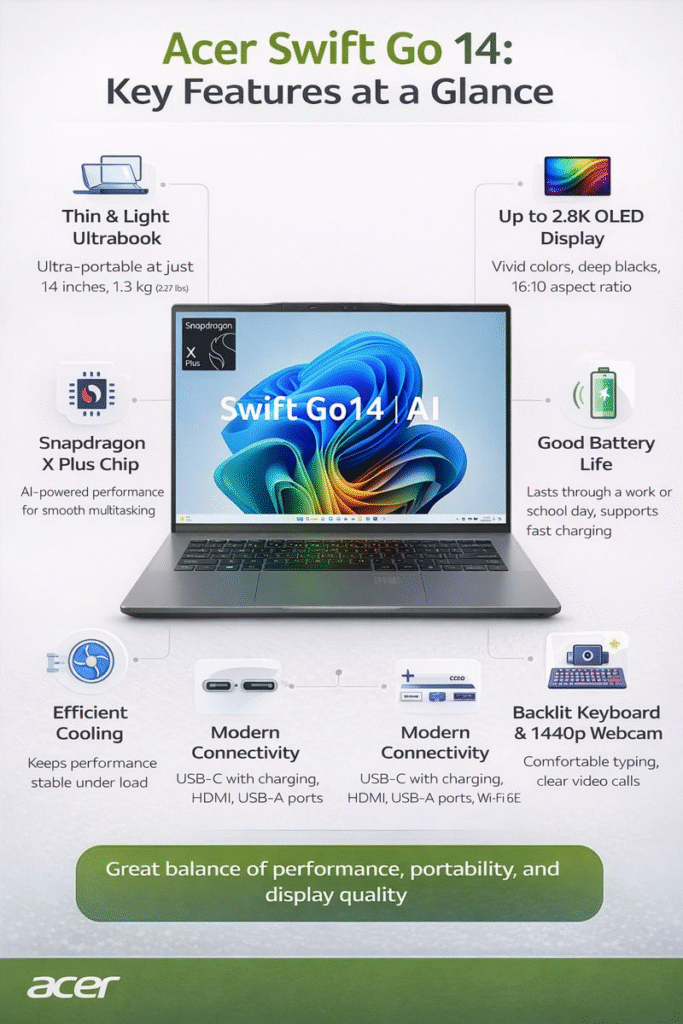
Despite its slim design, the Acer Swift Go 14 includes a practical selection of ports. Users get USB-C ports for charging and data transfer, USB-A ports for older accessories, an HDMI port for external displays, and a card reader for added convenience.
Wireless connectivity is stable and reliable, ensuring smooth internet access and file sharing.
Advantages and Disadvantages
Advantages
- Lightweight and easy to carry
- Excellent display options, including OLED
- Smooth performance for daily productivity
- Good port selection for a thin laptop
Disadvantages
- Integrated graphics limit gaming and heavy creative work
- Battery life varies depending on configuration
- Limited internal upgrade options
The Acer Swift Go 14 is a smart choice for users looking for a well-balanced laptop with strong display quality, reliable performance, and excellent portability. While it is not designed for heavy gaming or professional creative workloads, it excels as an everyday laptop for work, study, and entertainment.
Considering its features and pricing, the Acer Swift Go 14 offers good value and stands out as a competitive option in the 14-inch laptop segment.
Read more:- Asus ProArt PX13: The Creator Laptop That Challenges Bigger Workstations
FAQs
Is the Acer Swift Go 14 suitable for students and professionals?
Yes, it is well-suited for students and professionals who need a portable and reliable laptop for daily tasks.
Can the Acer Swift Go 14 handle multitasking?
Yes, it handles multitasking smoothly for everyday applications and productivity software.
Is the Acer Swift Go 14 good for entertainment?
The OLED display option makes it an excellent choice for watching movies and consuming media.
Does it support fast charging?
Yes, many configurations support fast charging, which helps reduce charging time.