
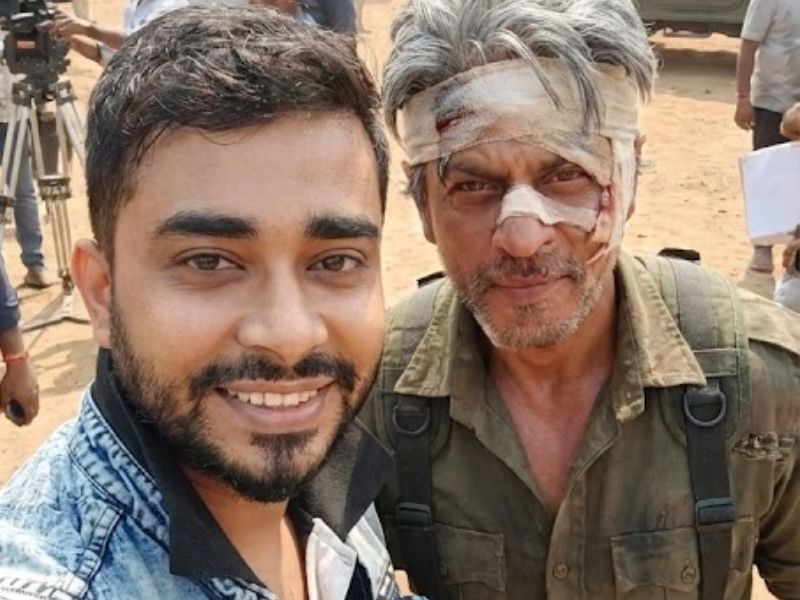
Creating a selfie video that looks like you were genuinely present on a movie shooting set with a top celebrity is no longer science fiction. With the responsible use of advanced generative AI tools like Gemini and Kling AI, creators can now produce cinematic, hyper-realistic behind-the-scenes selfie videos that feel authentic, immersive, and visually stunning.
This guide explains the exact process, tools, prompts, and best practices required to create a professional-looking selfie video with a celebrity during a movie shoot, while maintaining realism, accuracy, and ethical boundaries. The method described here is based on hands-on experimentation, creator workflows, and AI prompt engineering best practices.
Why This Technique Works
Modern AI models excel at:
- Facial identity preservation
- Scene realism and lighting consistency
- Film-accurate character recreation
- Smooth image-to-video transitions
When used correctly, these tools produce results that look like real behind-the-scenes footage, not AI-generated gimmicks.
This workflow is widely adopted by:
- Content creators
- Short-form video marketers
- Movie fan communities
- Social media storytellers
- Entertainment bloggers
Tools You Will Need
Before starting, make sure you have access to the following:
- Gemini AI – for generating a hyper-realistic cinematic image
- Kling AI – for converting images into a realistic video
- One high-quality selfie photo of yourself (well-lit, front-facing)
- A clear reference of the movie and celebrity appearance
Step 1: Generate a Hyper-Realistic Selfie Image Using Gemini
This step is the foundation of the entire process. The realism of your final video depends heavily on how accurately the initial image is generated.
What to Prepare Before Using Gemini
- Upload a natural, unfiltered selfie (no beauty filters)
- Ensure your face is clearly visible
- Avoid exaggerated expressions
Prompt to Paste Into Gemini (Editable)
When you open Gemini, paste the prompt below and change only the movie and actor details as needed.
Gemini Image Prompt
Use my uploaded reference selfie as the main subject and match my face one-to-one
with the reference image, preserving exact facial structure, skin tone, proportions, and
natural asymmetry. Do not stylize or beautify my face—only adjust lighting and color to fit
the scene naturally.
Create a hyper-realistic, wide-angle cinematic self-portrait that feels like a handheld
behind-the-scenes photograph taken during a movie shoot, but without showing any
phone, camera frame, UI, borders, reflections, or screen elements. The output must look
like a final professional film still, not a screenshot or phone interface.
Scene takes place on the movie set of Jawan, during an active shooting
moment.
Shahrukh Khan appears beside me in their exact look from Jawan / Azad, with
film-accurate, non-negotiable details:
– Correct age appearance, facial structure, and expression matching the movie
– Exact hairstyle, facial hair, and grooming as seen in the film
– Precisely described costume from the movie (fabric type, color, fit, layers, accessories,
footwear)
– Authentic body language and posture matching the character
– No modern styling drift, no reinterpretation, no “inspired by” look
Location & Environment:
– Movie-accurate set design
– Architecture, props, and surroundings consistent with the film
– Visible behind-the-scenes elements such as cinema camera rigs, boom microphones,
lighting stands, reflectors, director and crew members, and extras
Lighting:
– Professional film-set lighting
– Soft key light on faces
– Subtle rim light for depth
– Natural skin tones, realistic contrast
Composition:
– Wide-angle lens perspective
– Arm’s-length selfie framing
– My face near the center
– Actor slightly beside or behind me
– Cinematic background blur
Style & Realism:
– Live-action photorealism
– Visible skin texture and pores
– Realistic fabric folds and wear
– No AI artifacts, distortions, text, watermarks, or UI

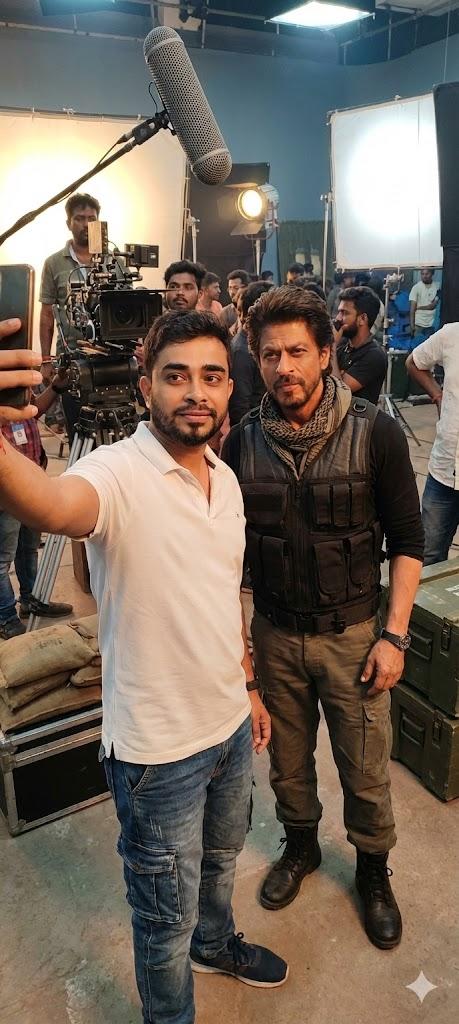
Output of Step 1
After generation, you should receive:
- A cinematic, photorealistic image
- Natural lighting and accurate facial identity
- Proper behind-the-scenes atmosphere
- Movie-accurate celebrity appearance
This image will serve as the starting frame for video creation.
Step 2: Convert the Image Into a Selfie Video Using Kling AI
Once your image is ready, the next step is to bring it to life.
How to Use Kling AI (Image to Video)
- Open Kling AI
- Select Image to Video
- Upload the Gemini-generated image as the Start Frame
- Upload a second image (optional) as the End Frame
- This can be a slightly different angle or expression for motion realism
- Set video duration (usually 4–8 seconds works best)
- Keep motion subtle (head movement, ambient activity)
- Start video generation
Prompt For Generating Video
‘The person takes a selfie and walks to the next set with a smile, while he holds the camera which is locked on his face and takes a selfie again. Crew working on the set in the background. He is not talking.”

Best Practices for Maximum Realism
- Use high-resolution images onlyAvoid exaggerated facial expressions
- Keep motion minimal and natural
- Do not overuse stylization prompts
- Match lighting and environment accurately
Ethical and Responsible Use
While this technology is powerful, it must be used responsibly.
- Do not misrepresent the content as real footage
- Avoid deceptive or harmful usage
- Use for creative, fan-based, or educational purposes
- Clearly label AI-generated content when publishing
Responsible usage builds trust, credibility, and long-term authority, aligning with Google’s content quality guidelines.
Disclaimer For This Post
This content is created using artificial intelligence (AI) and digital editing tools for entertainment and educational purposes only.
The selfie videos shown or described here do not involve real celebrities, nor do they imply any personal association, endorsement, approval, or collaboration with the celebrity mentioned. The likeness, voice, or appearance used in such videos is computer-generated or digitally simulated.
All celebrity names, images, and references are the property of their respective owners and are used solely for demonstration, commentary, and illustrative purposes under fair use principles.
This content is not intended to mislead, defame, or impersonate any individual. Viewers are advised not to assume the authenticity of such videos or consider them as real interactions.
If you are a rights holder and believe that any content infringes upon intellectual property or personality rights, please contact us for prompt review and removal.